VIRTUAL ASSISTANT
ALL FAQs
38. How safe are online payments? What about security?
Please see here for complete details.
10. How do I know that my computer is compliant with the requirements of this site?
Please click here to proceed to our system verification page.
Symptoms of incompatibility may be seen with older versions of Internet Explorer, in which case we strongly urge you to update your browser to the latest version or to download another compatible browser (i.e. Firefox, Safari, etc). With newer versions of Internet Explorer you should also make certain to turn off the "Compatibility View" option, since it is not required for our standards-compliant site and may make the site's contents appear misaligned.
7. I have forgotten my login information. How may I retrieve it?
No problem! Please click here to proceed to the username and password notification page.
6. I have started a course, but am having issues seeing the contents. Which browsers are supported?
All course content has been tested to work with Firefox, Safari, Chrome, and Internet Explorer 11 browsers (with JavaScript enabled) on PC and/or Mac computers. Please make sure you are using one of these and that you have the latest free version of Adobe Flash Player installed too - version 9.0 or above is recommended. Should organizational measures or security settings prohibit you from installing and/or activating the necessary plug-ins, we recommend you try another computer.
3. I finished a course but my certificate does not display properly. What should I do?
First, please try the following link (click here).
Adobe Reader 9.0, or above, is required. Please download the latest free version of Adobe Reader, then close your browser. Re-open a browser to log back into our site to save your certificate(s) to your desktop by clicking on the "save" icon. Next, open the saved PDF certificate file directly through Adobe Reader - by double-clicking the Adobe Reader icon, then selecting "File -> Open" and choosing the location of the saved PDF file. Should organizational security measures prevent the ability to install the above-named software, we recommend that the user try another personal computer.
8. I have an Apple / Mac computer and the certificate does not display properly. What should I do?
Saving the PDF certificate to your computer and opening it directly with Adobe Reader (not the Preview application that Macs are set to default to) settles this issue. It's a known limitation in Apple's Preview application that is regrettably outside of our control. From the same screen where you saw the certificate, click "View PDF", from there you can save the certificate to your desktop (by clicking on the "save" icon) and open it with Adobe Reader.
Adobe Reader software is the global standard for electronic document sharing. It is the only PDF file viewer that can open and interact with all PDF documents and implement the many internal features which are necessary for creating your certificate. Apple's Preview application can open simple PDF files but does not allow for any manipulation of secured PDF files, thus your certificate may not appear correctly until you open it with Adobe Reader. Additionally you may wish to set Adobe Reader as the default PDF file program to avoid similar problems with other documents in the future.
19. When will my book or certificate arrive in the mail?
Given the nature of our business - no books are necessary for the courses, and are not offered. The certificates may be easily printed as often as you like for the duration of the certificate. We do not mail the certificates of completion.
15. Can you mail me my certificate?
Due to the online nature of our business we do not mail certificates of completion. However, if you are having difficulties printing the certificate due to your system's software limitations, you may elect to fax a copy to any number in the US from the main menu.
35. Why is New York State (NYSED and NYSDOH) approval so important? Are you approved?
If you do not live or work in New York State, it may not be. However, for the thousands of clinicians and educators who do - an approved course provider is mandatory. In August 1992, legislation was passed establishing a requirement that certain health care professionals must receive training on infection control and barrier precautions every four years upon renewal of their license. In August 2008, legislation was passed requiring certain changes be made to the training curriculum, the training process, and those requiring training. The Infection Control and Barrier Precaution law applies to the following professions: dental hygienists, dentists, licensed practical nurses, optometrists, physicians, physician assistants, podiatrists, registered professional nurses and specialist assistants. As of November 3, 2008, the requirement for training will also include medical students, medical residents, and physician assistant students. Our Infection Control and Barrier Precautions course is approved by both the State of New York Department of Health (I02138) and the Education Department (IC161).
37. Are your certificates accepted by all other states?
Yes. At the time of this publication, New York State is the only locale that requires specific state-approved certification. There is no other state that has formal requirements for teaching any of the courses that we offer. Our certificates are accepted by virtually all local, State, and Federal organizations and employers.
24. "Loading...Please Wait" displays, but nothing else happens. What should I do?
This most often occurs when you have JavaScript disabled, a firewall is enabled, and/or your firewall settings are preventing JavaScript from running. For more information about enabling JavaScript in your browser, please see here. Or please either disable your firewall temporarly or lower its settings to allow scripting. You can find more information about disabling a Firewall here and/or here. Additionally, this issue may be caused by an unsupported or misconfigured web browser (e.g. some versions of Internet Explorer), so please try another browser such as Chrome, Safari, or Firefox too.
28. I was using PayPal to purchase a course and received an error. What now?
Although we are not directly involved in how PayPal handles the payment process, we will be more than happy to try to troubleshoot your issue. Please let us know of the type of error you are receiving. If for some reason your PayPal payments are repeatedly denied or an error is received from PayPal, you should try payment via credit card instead. Rest assured, no money will be deducted from your account without your final approval and prompt confirmation via email.
39. How safe is my personal information?
We do not sell, share, or otherwise disclose any of your personal information to any third party. The exception to this is during processing of your payment via Authorize.net or PayPal and when submitting NYS certificates to the New York State Education Department. In these exempt scenarios, all information is transmitted via the highest level of SSL/TSL security available. Please see our Privacy Policy for more.
11. When printing my certificate, it comes out small. What can I do?
In Adobe Reader, please select "File" --> "Print". In that menu select "Page Scaling" to "Fit to Printable Area" and select "Auto-rotate and Center", then try printing again.
1. How do I get and print my certificate?
Please log in to your account and click "Print", "E-Mail", or "Fax" next to the "Actions" area of the "MY CERTIFICATES" tab to retrieve a copy. These features are free and available for the duration of your certificate! See here for more.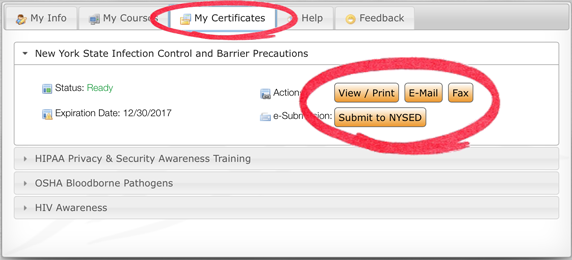
9. How many times can I take the quiz?
As many times as you like during the 30-day active window. The minimum passing score is 70% for all courses.
20. Do I have to take the course in one sitting?
Not at all. You may log back in and continue your course as often as you like during the 30-day active period.
22. I have questions. How do I contact VMD Health Care Training?
The best way to contact us is through the "Contact Us" tab above. A representative is available for Live Chat Monday-Friday 9AM-5PM EST. Alternatively you may send us an email from the "Contact Us" tab and we will generally respond within 30 minutes or less! Due to the often-times mobile nature of our training center staff, we cannot guarantee a timely response to phone calls and voice mail messages so the afore-mentioned two options are highly recommended.
23. I sent an email but have not received a reply!
We make every possible effort to respond to your e-mail messages within 30 minutes or less during business hours. However, if you have not received a response please check your e-mail Junk Mail folder and/or add  to your safe sender list.
5. I have finished reading the materials. How do I take the quiz?
In the right-hand portion of the course window, please find the button labeled "Quiz" and click it.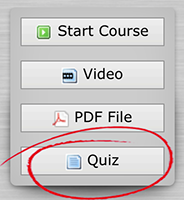
17. What is your refund policy?
Your satisfaction is extremely important to us! Should you experience any technical difficulties with any of our courses which prevent your from completing them, and all technical support troubleshooting measures have failed to resolved the issue, we will promptly offer a 100% refund to your credit/debit card or PayPal account. All requests for refunds must be submitted via email or the Contact tab. However, no refunds will be issued once a course is already completed or if the 30-day registration window has expired. If necessary, you may request an extension to your registration window. Should you request your credit card issuer to cancel or reverse payment, your account will be immediately suspended, certificate(s) revoked, and associated governing bodies notified of your revoked certificate(s), and you will furthermore become liable for any and all charges incurred by VMD Health Care Training through the chargeback, for which you will be billed.
26. When trying to submit my certificate to New York State, my profession is not listed.
Regrettably, if it is not listed then New York State does not currently accept/require electronic submissions of your credentials.
36. Which professions are eligible for the New York Infection Control course?
Any profession whose licensure is governed by the New York State Education Department and/or the New York State Department of Health (dentists, dental hygienists, licensed practical nurses, optometrists, podiatrists, registered nurses, physicians, physician assistants, and specialist assistant, etc). Some professions (i.e. tattoo artists) may have special requirements. Please consult your profession's administrative body to determine whether NYSED/NYSDOH training is acceptable or if they require their own specific infection control training.
27. What payment methods are accepted?
VISA, MasterCard, and Discover credit/debit cards and PayPal are the currently accepted payment options. For corporate accounts, American Express (via PayPal) and company checks are also acceptable.
30. Can I add more than one name to a certificate?
No. Each certificate may only contain one name. If you attempt to add additional names - certificates and cards will not be printed and your account may be subject to termination. Please create a separate account for each student.
31. I forgot to enter a discount code. Can I get a partial refund?
Partial refunds are not available. However, if you contact us immediately (usually within 1 hour), we may be able to stop the credit card transaction, refund the full payment, and cancel your account. You would then be able to re-register and use the discount code. If, however, sufficient time has lapsed, or if you have already started or completed a course, we will not be able to offer partial refunds for the difference.
33. I have successfully logged in before, but now it is not letting me. What should I do?
You may need to clear your browser's cache. Please visit here for more. Alternatively, you may need to reset your "Privacy Browsing" settings.
34. What are the types of Group Rate accounts?
There are two types of corporate accounts available:
- The "pre-paid" account provides the organization with a discounted rate and allows all students to be pre-registered. This type of account is generally best for a one-time small- to medium-size group registration where the cost of registration is handled by the company. The names of your students must be known ahead of time, however, so that they can be manually entered into our registration database.
- The "discount code" account option allows the students to register on their own and enter a discount code which will lower the price on the selected course. This provides the organization with a single training location at a custom website for current and/or future staff members to take a course when necessary over an unrestricted period of time. This option is best for large groups that have a constant flow of trainees/students.
In both cases the discount is dependent on the number of students, so please contact us for a quote. You can also get more information and a preview of the free features included in our corporate accounts here.
4. My certificate looks fine in Adobe Reader, but does not print right.
In Adobe Reader, please click Print --> Advanced --> and select "Print As Image". Please click here for more.
18. I need to change my name or license number. How do I do that?
When logging into your account for the first time, you will be asked to update your name for how your wish for it to appear on the certificate. You will also be able to enter a license number, if you wish. Once that is done, however, you will need to contact us directly with the requested changes, and we will change them manually in the database. Once updated, you can download another copy of your certificate.
12. The only thing that appears on my certificate is my name, license number, today's date along with your seal. Is this correct?
Not quite. This may sometimes happen on Mac computers, since they default to open PDF files via the Preview application which does not properly format our secured certificates. Saving the PDF certificate to your computer and opening it directly with the latest version of Adobe Reader (not the Preview application that Macs are set to default to) settles this issue. It's a known limitation in Apple's Preview application that is regrettably outside of our control. From the same screen (Main Menu) where you saw the certificate, click "View PDF", from there you can save the certificate to your desktop and then open it directly with Adobe Reader (File--> Open --> location of saved PDF). Alternatively you may wish to set Adobe Reader as the default PDF file program to avoid similar problems in the future.
13. Once I complete a course, how long is the certificate maintained for and how often can I access it?
We maintain your certificate for its entire duration (i.e. 1, 2, or 4 years, depending on the course). In addition, records of completion and accounts are maintained for six years. You can access your certificate (view, save, print, fax, and/or submit) free-of-charge as many times as you like, as long as it has not expired, by simply logging back in to your account.
21. My certificate is set to expire or has expired. What are my options?
You may simply click "Renew Course" from the main menu to purchase a renewed course registration.
16. How many continuing education credits can I claim and how are they rated?
Since so many professions use different standards for continuing education, we designate each course's continuing education value as "contact hours". This value can be found on each course's respective page on this site and on the printed certificates. Past that, it is then up to the individual or organization to determine how those will apply to his/her professional licensing board and in what form (i.e. CEU, CME, CE, etc). Unfortunately, we do not know of each board's criteria and thus recommend that you contact your organization directly for details on how to apply the continuing education hours earned through us to your specific need and format.
14. I want to save the certificate to my computer. How do I do that?
That will depend on the type of web browser you are using. From the same screen where you clicked "Begin Course", please click "Print". If you have Adobe Reader plug-in installed, your certificate will appear in that window, and there you can simply click the "Save" button which looks like a computer disk. If your certificate does not appear, then you may need to click "View as PDF" and your computer will open or save the certificate as a PDF file to the default location on your computer. The action your browser takes will depend on the current settings of your system, browser, and/or Adobe Reader. Please remember to always open your certificate with Adobe Reader, not any other PDF reader.
2. Trouble seeing the course content and/or quiz.
Please make sure that you are using a compatible browser ( Chrome,
  Firefox,
  Safari, IE11) and that Frames and JavaScript are enabled.
This most often occurs when you have JavaScript disabled, a firewall is enabled, and/or your firewall settings are preventing JavaScript from running. For more information about enabling JavaScript in your browser, please see here. Or please either disable your firewall temporarly or lower its settings to allow scripting. You can find more information about disabling a Firewall here and/or here.
If these measures fail, we strongly recommend you try a different computer, browser, or network (if working from office/school) - as some of your settings or plug-ins may be the cause.
40. When logging in the screen just goes back to the login screen!
The system may not have fully finished processing your registration. Please attempt logging in again in just a few minutes. If still unsuccessful after 15 minutes, please contact our technical support team to ensure that your registration was finalized.
29. Can I download and print the course materials before I take the quiz?
Absolutely! Each course has a link to a downloadable PDF file. You can then return to the quiz whenever time permits.
41. No date of completion on certificate.
In Adobe Reader, please click Print --> Advanced --> and select "Print As Image". Please click here for more.
42. How do I know if my certificate has been submitted to the NYSED?
Simply log back into your account. Click "My Certificates" and look for the e-Submission part. If the "Submit to NYSED" button is active, then either you have not yet requested your certificate to be submitted or the request is being processed. Otherwise, the "Submitted" message will be displayed in that area.
We do not have any control over when/how the NYSED processes the certificate past this point. Please contact them directly with licensing questions.
43. What is my group discount code?
Please contact the appropriate representative at your organization (e.g. HR, course coordinator, supervisor). We cannot give out discount codes to individuals.
44. NYSED (New York State Education Department) certificate submission question.
Please note that we do not govern what and how the NYSED processes certificates. If you are trying to submit an electronic copy of your certificate to the NYSED and either your profession is not listed, or you do not have a part of the required fields (i.e. SSN, license number, etc.), then we regrettably cannot be of further help as all data fields are provided by the NYSED directly.
45. Group registration questions.
Our policy governs that a minimum of 5 (five) accounts must be purchased to qualify for group discount rates. Additionally, if you are interested in purchasing multiple courses for your group, then the two (or more) course groups will have be registered separately as two corporate accounts.
46. Incompatible system. Would like a refund.
Our refund policy is that you must attempt to resolve the issue via technical support. If all attempts fail, then you are eligible for a refund. Please note that our system has been extensively tested to work in all modern systems and browsers.
47. My ACLS, BLS, CPR, CABS, or BFA certificate is expired. How do I renew it?
Unfortunately, we no longer offer any of these courses. Thank you.
48. Internet Explorer 8
As you may be aware, Microsoft had ended all support for Windows XP in 2015. Internet Explorer 8 (IE8) - the most recent version of IE that will run in Windows XP - will no longer be supported by Microsoft. As a result, Internet Explorer 8 will no longer be supported for use with our website. If you continue to use Internet Explorer 8, you may experience serious issues which will prevent you from completing actions or prompt error messages. To avoid these issues, users who are currently running IE8 should upgrade. Click the link below to visit Microsoft's website and download IE9. http://windows.microsoft.com/en-us/internet-explorer/ie-9-worldwide-languages Windows XP users who are unable to upgrade to IE9 should use a different browser, such as Firefox or Chrome. Firefox: http://www.mozilla.org/en-US/firefox/new/ Chrome: https://www.google.com/intl/en/chrome/browser/ If your institution prevents you from downloading and installing new applications, please contact your IT department.
49. Setting up a pay-as-you-go group account.
Unfortunately, we do not offer this option yet.
50. I have just signed up, and am unable to log in.
At times, it may take a few minutes for the system to fully process your registration. Please try logging in again in just a few minutes. If you are unable to log in after 15 minutes, please contact us to ensure that your registration was successful. Thank you.
51. General Payment Failure - when registering
This message indicates that our credit card processor is unable to communicate with your web browser.
This most often occurs when you have JavaScript disabled, a firewall is enabled, and/or your firewall settings are preventing JavaScript from running. For more information about enabling JavaScript in your browser, please see here. Or please either disable your firewall temporarly or lower its settings to allow scripting. You can find more information about disabling a Firewall here and/or here.
If these measures fail, we strongly recommend you try a different computer, browser, or network (if working from office/school) - as some of your settings or plug-ins may be the cause.